Microsoft Copilot Landscape
Microsoft uses the Copilot name for a family of AI experiences across productivity, development, security, cloud, data and business platforms. Understand them by the work they support.
What work do you want help with?
Select an area to open its explanation, example and official reference.
A purpose map of key enterprise experiences, not an exhaustive product count. Microsoft Copilot for personal use is a separate context. Product names, availability and licensing evolve; check the official references for your environment. Reviewed 8 October 2026.
Microsoft Copilot at a glance
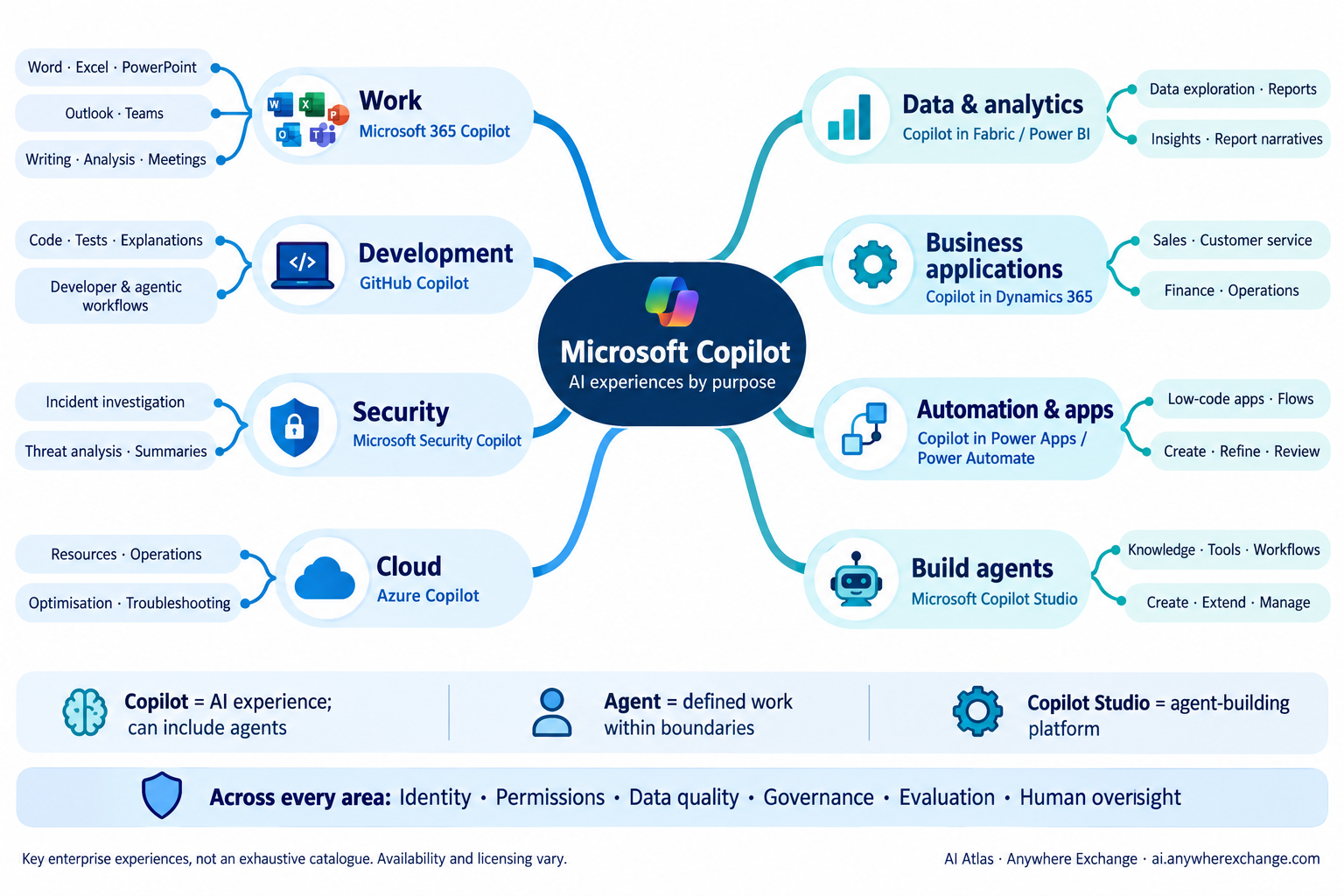
The branches group key enterprise experiences by purpose; they do not show dependencies or a required sequence. Use the interactive map above and the official references below to explore each area.
WorkMicrosoft 365 Copilot · Word · Excel · PowerPoint · Outlook · Teams
Helps with writing, analysis, presentations, email and meetings in Microsoft 365.
Summarise a meeting and draft follow-up actions for review.
Available features and work-data grounding depend on the licence, tenant settings and user permissions. Copilot Chat and in-app experiences are not identical. Microsoft 365 Copilot is available through eligible Business and enterprise offers. See Microsoft 365 Licensing for Copilot Chat, paid add-ons and integrated subscriptions.
Official documentationDevelopmentGitHub Copilot · Code · Tests · Developer workflows
Assists developers with coding, explanations, tests and software development tasks. Some experiences support agentic work.
Ask for a test draft, then review and run it before merging.
Generated code still needs review, security checks and validation. Features depend on the plan and development environment.
Official documentationSecurityMicrosoft Security Copilot · Investigation · Threat analysis · Security operations
Supports security teams in analysing security information, investigating incidents and understanding threats.
Summarise incident evidence to help an analyst decide the next step.
Use authorised data sources and validate conclusions. Security Copilot does not replace accountability for security decisions.
Official documentationCloudAzure Copilot · Azure resources · Operations · Troubleshooting
Helps users understand, operate, optimise and troubleshoot their Azure environment.
Ask for help investigating a resource configuration or explaining an Azure error.
Previously often called Copilot for Azure. Access and actions follow Azure permissions; actions require confirmation.
Official documentationData & analyticsCopilot in Microsoft Fabric / Power BI · Data exploration · Analysis · Reports
Supports data and analytics tasks across Fabric experiences, including Power BI report creation and exploration.
Ask questions about a report or get help drafting a report narrative.
Reliable insights depend on data quality and the semantic model. Capacity, settings and feature availability affect access.
Official documentationBusiness applicationsCopilot experiences in Dynamics 365 · Sales · Service · Finance · Operations
Embedded AI capabilities help people perform tasks in specific Dynamics 365 business applications.
Help a service representative summarise a customer case.
This is a family of app-specific experiences, not one uniform product. Capabilities and agents vary by application.
Official documentationAutomation & appsCopilot in Power Apps / Power Automate · Low-code apps · Flows
Helps makers describe, create or refine apps and automations using natural language.
Describe an approval process and use the draft flow as a starting point.
Power Apps and Power Automate are platforms with Copilot capabilities. Review connectors, permissions and flow behaviour before use.
Official documentationBuild agentsMicrosoft Copilot Studio · Agent creation · Tools · Knowledge · Governance
A platform for creating, extending and managing agents that use knowledge, tools and workflows.
Build an internal support agent using approved knowledge and controlled actions.
Building an agent does not automatically grant it access or make it safe. Configure identity, permissions, evaluation and oversight.
Official documentationCopilot, agent and Copilot Studio
Copilot: the experience
An AI experience that helps people work. It can include tools and agents, with different levels of autonomy.
Agent: defined work
An AI system that performs tasks toward a goal within configured boundaries. Agents can be embedded in Copilot experiences or used elsewhere.
Copilot Studio: the platform
Tools for building, extending and managing agents. It is one way to build agents, not the definition of an agent.
Don’t try to count every Copilot. Understand where it fits and what job it is designed to help with.
Learn more
Microsoft’s Copilot learning hub · Explore the wider AI ecosystem · Back to the vocabulary entry