Microsoft 365 Licensing & Value
Match entitlements to the work. Protect productivity, security and employee experience before optimising spend.
The licensing ecosystem at a glance
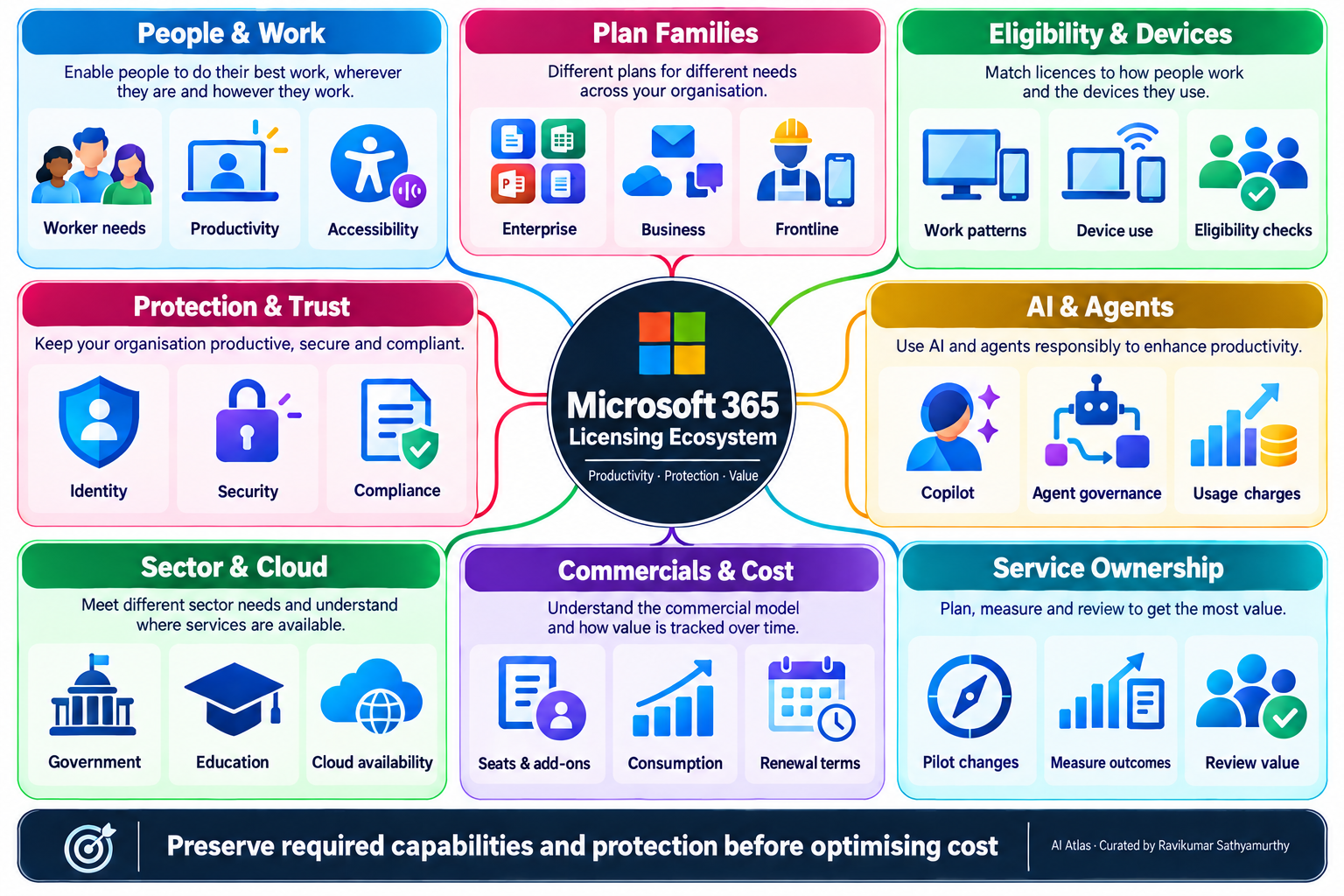
Microsoft 365 licensing ecosystem
Work needs · Required capabilities · Appropriate entitlements · Service outcomes
People & work
Productivity suites
Frontline work
Protection & trust
AI & agents
Sector & cloud
Commercials & optimisation
Service ownership & value
Across every branch: preserve productivity, meet required controls, validate eligibility and measure value. The map shows connected decisions—not a mandatory progression to the highest tier.
Microsoft 365 E3
Explore the relevant plan families
Expand a plan for its role and the checks that matter. These are selected families, not every SKU, procurement channel or entitlement.
Microsoft 365 and Office 365 are different suites. Teams variants, add-ons, prerequisites and government-cloud availability must be checked separately. Public plan descriptions do not replace your agreement and Product Terms.
Optimise value without reducing capability
1. Establish the service baseline
Record tasks, installed apps, offline needs, mailbox and storage use, accessibility, device patterns and integrations. Agree mandatory security and compliance controls with their owners.
2. Review assignment and actual use together
Reconcile purchased, assigned and actively used licences. Investigate joiners, movers, leavers, duplicate entitlements and unused add-ons. Low usage alone does not prove that a licence is unnecessary: seasonal work, recovery, accessibility and mandatory controls may justify it.
3. Compare full cost and operational impact
Compare a suite with the equivalent base plan and required add-ons under your actual commercials. Include support effort, retraining, integration changes and consumption. An upgrade can offer better value; a lower-priced plan can introduce friction or risk.
4. Pilot and validate before changing
Test representative users and critical workflows. Check productivity, task completion, employee feedback, support demand and required controls. Plan mailbox, archive, retention, desktop activation and device impacts. Agree rollback and obtain service, business, security and commercial owner approval.
5. Make the saving achievable
Reclaiming an assignment does not necessarily reduce the invoice. Check renewal dates, seat-reduction rules, commitment terms and reassignment restrictions before recording realised savings.
6. Keep accountable ownership
Maintain a persona-to-entitlement record with assumptions, approvers and review dates. Track service outcomes, cost per productive user or successful task, and protection alongside spend. Refresh when work, technology, contracts or regulations change.
Microsoft Product Terms · Enterprise-to-frontline change guidance
Official pricing, billing & optimisation references
Plan pricing and commercial comparison
Microsoft 365 enterprise pricing — compare advertised plans and inclusions.
Microsoft 365 business pricing — review business plans and available bundles.
Use your negotiated net price, currency, taxes, Teams variant, commitment and renewal terms for budgeting. Public list prices are a reference, not your actual cost.
Eligibility, entitlements and seat reductions
Microsoft Product Terms — validate use rights, eligibility and restrictions under the applicable programme.
Buy or remove subscription licences — understand changes to purchased seats, billing and reduction windows. Your purchase channel and agreement determine the applicable process.
Usage evidence and productivity protection
Microsoft 365 usage reports — examine service adoption before reviewing assignments.
Enterprise-to-frontline change guidance — check application, mailbox and other capability differences before changing a plan. Combine usage evidence with business needs, required controls and a representative pilot.
Copilot and agent consumption costs
Copilot Credits billing and cost management — understand usage-based charges alongside user subscriptions.
Copilot Studio billing rates and management — review current consumption meters and monitoring.
Copilot Studio licensing guidance — review purchasing models, prerequisites and included usage. Do not assume every agent workload is covered by a user licence.
Budget review: recurring seats and add-ons + metered usage + implementation and ongoing service costs. Assess savings alongside task completion, employee experience, support demand and required protection. Reference review: 9 October 2026; sources can change.